CryFs: The filesystem that made me almost cry.
how to use CryFs to keep your files private, and the mistake that almost wiped me out.
ever heard of CryFs? it’s a filesystem, but not like the traditional ones you know. what makes it different is that it’s encryption-first, it runs on top of a regular filesystem and encrypts your files on the fly.
in my first year at university, i was looking for a way to keep my files private without a complicated setup. i wanted to make sure that even when my friends used my computer, they couldn’t access certain files. so i came across CryFs, studied it for a bit, and thought yeah, this is the solution.
i immediately started storing files i considered super important and private inside it, and it worked smoothly. then i made a mistake, i moved the lock inside the vault.
the cryfs.config is the decryption key, and without it the vault is permanently locked. i didn’t figure this out until i rebooted my PC and tried to mount again.
i looked up solutions hoping there was some recovery path, but there wasn’t. the config is unique to every instance. i was choked. 200gb of files, just gone.
thankfully my most important stuff was backed up in the cloud, so it wasn’t a total loss.
now let’s talk about what CryFs actually is, how to use it, and the mistakes to avoid.
what is CryFs?
CryFs is a FUSE-based encrypted filesystem. it lets you store files in encrypted form and access them in real time. it’s hot-pluggable, meaning you can mount and unmount your encrypted files whenever you need them, with no manual encryption steps involved.
the way it works: you create two directories. one is the vault, where your files are stored as encrypted blocks. the other is the access point, where you read and write your files in decrypted form while the filesystem is mounted. the encryption and decryption happen on the fly.
how to use it
to get started, create the two directories and run CryFs:
1
2
mkdir vault accesspoint
cryfs vault accesspoint
a quick note:
vaultandaccesspointare just the names i used for this post. you can name these directories whatever you want. just know there are always two: one for the encrypted data, one for the decrypted access point.
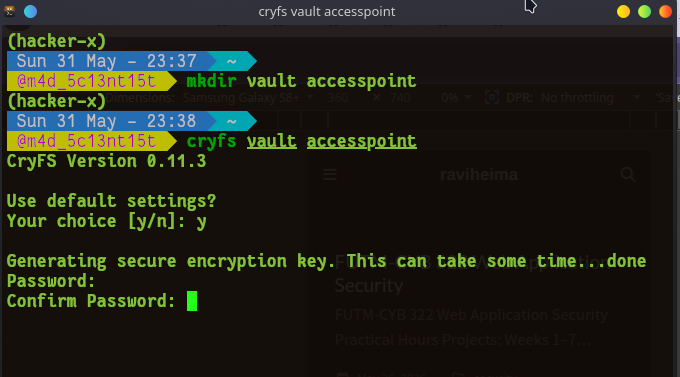
you’ll be prompted to use default settings (enter y), then set a password. CryFs will derive an encryption key, mount the access point, and the directory will be ready for use.

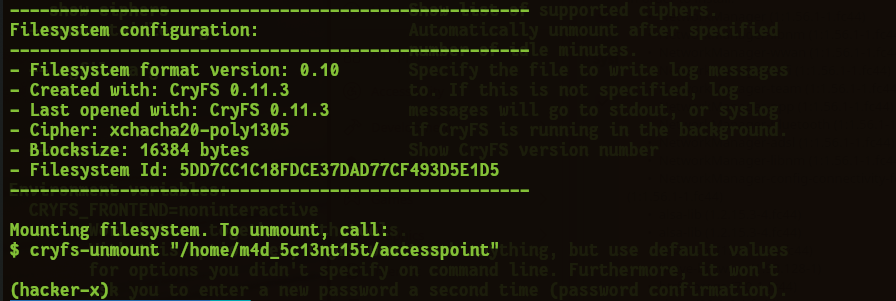
if you run ls vault, you’ll see it contains a folder and a file called cryfs.config. that’s the decryption key. this is what my ignorant self moved from the vault into the accesspoint. without it, you can’t decrypt or access the files in the vault once you unmount.

here’s how it works in practice: your access point is where you read and write files. each time you add a file, a new encrypted block is created in the vault.

every addition or deletion updates in real time. the data in the vault is completely unreadable without the password, the access point is only available while mounted. once you unmount, the access point becomes empty and your data stays locked in the vault in encrypted form.
to mount your vault:
1
cryfs vault accesspoint
to unmount (which locks the vault):
1
2
3
#cryfs-unmount <full-path-to-mount-point> in my case it is

cryfs-unmount "/home/m4d_5c13nt15t/accesspoint"
when to use CryFs
- you don’t want files sitting unencrypted on disk
- you share your computer with others and want certain files hidden
- you need encryption that works on the fly, no manual steps on access
- you’re paranoid about local disk access (which you should be)
advantages
- only the mounting user can access a CryFs mount point, not even root
- real-time encryption and decryption with no manual effort
- hot-pluggable: mount when you need it, unmount when you’re done
- works on most filesystems (ext4, NTFS, etc.)
- encrypts files individually rather than the full disk
- protects against physical theft, encrypted files are useless without the password
things to avoid
- don’t move the
cryfs.configout of the vault (like i did) - back up your
cryfs.configsomewhere safe, losing it means losing access to everything - don’t forget your password, there’s no recovery mechanism
- don’t store the vault on unreliable storage
- don’t assume the access point is safe, it holds decrypted data in RAM
- don’t unmount and remount without proper backups in place
conclusion
CryFs is a powerful tool for keeping files private without the headache of manual encryption. just don’t be like me and move your cryfs.config into the vault. thanks for reading, see you on the next one.